As an Amazon Associate I earn from qualifying purchases. This page may contain affiliate links.
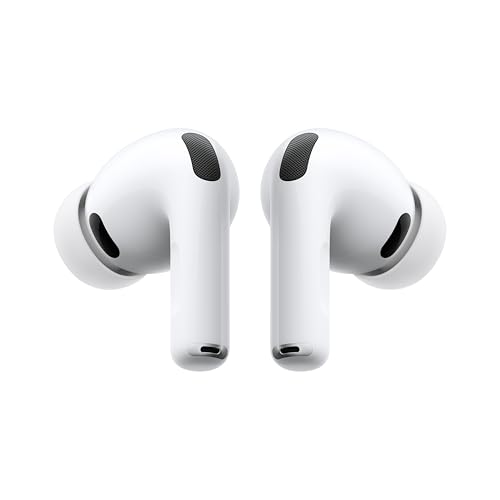
Apple AirPods 4 active noise cancelling is a feature found on specific versions of the AirPods 4 lineup, and knowing which version you have is the first step to getting the quiet you expect. This guide explains how to confirm your model, turn the feature on, adjust it for your environment, and fix the most common problems owners run into. By the end, you should be able to use noise cancelling confidently on a train, in an office, or on a noisy street.
Confirm Which AirPods 4 Model You Own
Apple sells the AirPods 4 in two configurations. One has an open, non-sealing fit and no active noise cancelling. The other, with active noise cancelling, uses a more enclosed design and an internal sensor setup that measures ambient sound and generates an opposing signal. Apple markets the noise cancelling version as the one with Active Noise Cancellation, and the model is often identified by the presence of that feature in the product name or packaging.
Shopping for one? See our guide: 7 Best Apple AirPods 4 Noise Cancelling Models Compareds (2026).
Because the two versions look similar at a glance, check before you assume. Packaging, the Apple product page, or the model number printed on the case can help. If you are shopping, read the product title carefully, since several listings use similar wording.
Check the Model on Your Phone
- Open the Settings app on your iPhone or iPad.
- Tap Bluetooth and find your AirPods in the device list.
- Tap the information button (the small “i”) beside the name.
- Look at the Model Name and Model Number fields, then compare them with Apple’s support documentation.
How to Turn On Active Noise Cancelling
Once you have confirmed you own the noise cancelling model, enabling the feature takes only a few seconds. Make sure the earbuds are in your ears and connected to your device before you start.
On iPhone or iPad
- Put the AirPods in and confirm they are connected.
- Open Control Center by swiping down from the top-right corner (or up on older devices with a Home button).
- Press and hold the volume slider until the listening mode options appear.
- Select Noise Cancellation. Other choices include Transparency and Off.
On Mac
- Click the Control Center icon in the menu bar, or the Sound menu.
- Choose your AirPods as the output device.
- Select the listening mode and pick Noise Cancellation.
Using the Stem Press Shortcut
You can also cycle between modes by pressing and holding the stem of an earbud. Owners can usually set this in the Bluetooth settings page for their AirPods, where a menu lets you choose which modes the press cycles through. Check that the setting matches what you want before relying on it in public. If you want more background, see Best Noise Cancelling Headphones: 6 Over-Ear Models Compared.
Understand the Listening Modes
Active noise cancelling is one of several listening modes, and choosing the right one for the situation makes a real difference. The table below summarizes the typical use case for each mode.
| Mode | What it does | Best for |
|---|---|---|
| Noise Cancellation | Reduces steady, low-frequency sounds such as engine rumble, HVAC noise and train hum | Commutes, flights, open offices |
| Transparency | Lets outside sound pass through so you can hear your surroundings | Walking, crossing streets, conversations |
| Off | No processing applied to ambient sound | Quiet rooms, longer battery life |
Factors That Affect How Well Noise Cancelling Works
Active noise cancelling performs best against consistent, low-pitched sounds. It is far less effective against sudden noises like a slammed door, a siren, or someone shouting nearby. Understanding this limit helps you set realistic expectations.
- Fit. A good seal blocks more sound. If you can feel the earbuds shifting, try a different ear tip size.
- Environment. Steady noise such as rail travel or airplane cabins responds well. Irregular noise responds less.
- Volume. Playing audio at a moderate level improves perceived noise reduction, because you are not competing with loud sound.
- Ear tip seal. Make sure the tip sits fully in the ear canal and the stem points in the right direction.
Checklist Before a Noisy Commute
- Confirm you own the noise cancelling model.
- Charge the case and check the battery on your phone.
- Pair with your device and set Noise Cancellation as the default mode.
- Test the fit by shaking your head gently.
- Set a comfortable volume before the noise begins.
Common Problems and Fixes
The Noise Cancelling Option Does Not Appear
Make sure you are holding down the volume slider, not just tapping it. Also confirm the earbuds are connected to the correct device. If the option still does not show, restart your phone and reconnect the AirPods.
Noise Cancelling Feels Weak
Check the ear tip seal first. A loose fit allows outside sound to leak in. Try the other tip sizes included in the box. Clean the mesh openings with a dry, soft brush, since debris can reduce performance.
Audio Cuts Out or Sounds Uneven
Low battery, interference from other Bluetooth devices, or a dirty charging contact can cause this. Keep your phone close to the earbuds and recharge the case. Owners often find that a full reset of the earbuds through the Bluetooth settings clears persistent issues.
For a broader set of fixes, see Why Does My AirPods Keep Pausing? 7 Causes and Fixes and Right AirPods Not Working? 8 Fixes to Try First. If you are weighing options before buying, How to Choose the Right Active Noise-Cancelling Earbuds walks through the factors that matter most.
Tips for Getting the Most Out of It
- Use Transparency mode when you need to hear announcements or traffic, then switch back.
- Keep the case charged, since noise cancelling uses more power than standard listening.
- Clean the earbuds and the case regularly to keep the mesh and contacts clear.
- Store the case in a protective sleeve to avoid scratches on the charging surface.
Common Mistakes
- Assuming all AirPods 4 models cancel noise. Confirm the model before expecting the feature.
- Using the wrong ear tip size. A poor seal is the most common reason for weak performance.
- Turning volume up to mask noise. High volume can strain your hearing. Use a moderate level and let the feature do the work.
- Leaving the earbuds in Off mode out of habit. Set your preferred mode once in settings so you do not forget.
Recommended gear
Several accessories can make daily use more comfortable and protect your investment.
- Apple AirPods 4 Case Protector. A silicone or hard case guards the charging case against drops and scratches. View on Amazon
- Replacement ear tips. Extra tip sizes let you find the seal that blocks the most noise for your ears. View on Amazon
- Soft cleaning brush. A dry brush removes lint from the mesh without damaging the speaker openings. View on Amazon
FAQ
Does every AirPods 4 have active noise cancelling?
No. Apple offers the AirPods 4 in versions with and without active noise cancelling. Check the model number or product name before buying or relying on the feature.
How do I know if noise cancelling is on?
Open Control Center on your iPhone and look at the listening mode selector, or check the Sound menu on a Mac. The active mode is highlighted.
Can I use noise cancelling while on a phone call?
Yes. The feature works during calls as well as music playback, and you can switch modes during a call from the same controls.
Why is noise cancelling less effective on sudden sounds?
Active noise cancelling is designed for steady, predictable sound. Abrupt noises change too quickly for the system to counter them fully.
Does noise cancelling drain the battery faster?
It uses more power than standard listening, so keeping the charging case handy is a good habit. Battery life varies with usage, and Apple publishes estimates for each model.
Is it safe to listen with noise cancelling at high volume?
Noise cancelling can reduce the need for high volume, which helps protect hearing. Listening at high levels for long periods still carries risk. If you have concerns about hearing loss, consult an audiologist or other qualified hearing professional.
Can I use active noise cancelling with an Android phone?
Some features depend on Apple devices, and the full set of controls is best managed on iPhone, iPad or Mac. Check Apple’s current compatibility information for the latest details.
Why does the feature sometimes turn off by itself?
Listening modes can change if you switch devices, pause audio, or if the earbuds reconnect. Reselect Noise Cancellation in Control Center if this happens.
Conclusion
Apple AirPods 4 active noise cancelling works best when you confirm you have the right model, choose the correct listening mode, and get a snug ear tip seal. Use Transparency when you need awareness of your surroundings and Off when you want to conserve battery. With the steps and fixes above, you can handle most situations without guesswork. For further reading, explore How Active Noise Cancellation Works to understand the technology behind the feature.