By Owen Palmer
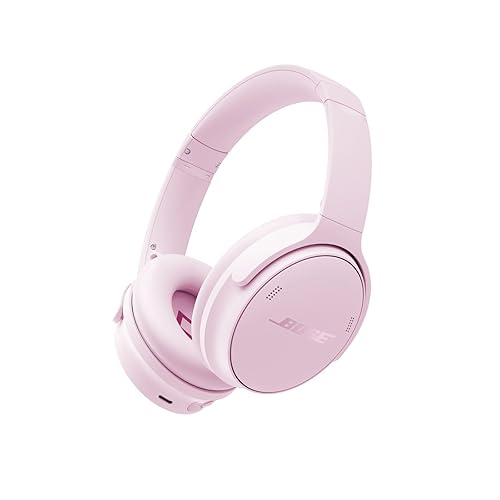
A bluetooth transmitter for Bose headphones lets you send audio from a device that has no Bluetooth or a wired-only output, such as an older TV, an airplane seatback jack or a legacy stereo, to a pair of Bose headphones that accept a wireless signal. In this guide you will learn which type of transmitter fits your setup, how to connect and pair it, how to check audio quality and latency, and how to troubleshoot the problems owners run into most often.
What a Bluetooth Transmitter Does for Bose Headphones
A transmitter takes an analog or digital audio signal from a source and broadcasts it over Bluetooth. Your Bose headphones act as the receiver. This is the opposite of a receiver, which takes a wired signal and turns it into Bluetooth on the headphone side. Many people search for one of these devices when they want to use Bose wireless headphones with a source that has only a 3.5 mm headphone jack, or when they want to share one audio source with the headphones and another listener at the same time.
Shopping for one? See our guide: Beats by Dre Headphones vs Bose: Which Should You Choose? (2026).
Keep in mind that Bose headphones are designed to pair with Bluetooth sources directly. A transmitter is a workaround, so the result depends heavily on the quality of the transmitter, the codec it uses and the distance between the two devices.
Step 1: Confirm Your Source and Headphone Connections
Before buying or setting anything up, identify the output your source offers. Most transmitters connect through one of these:
- 3.5 mm analog audio jack (the most common on TVs, laptops and older players)
- Optical (TOSLINK) digital output, common on TVs and home theater receivers
- RCA red and white analog outputs, common on older stereos
- USB, for some transmitters powered from a computer or TV port
Next, confirm which Bose model you own. Many Bose over-ear and on-ear models support Bluetooth and a separate wired connection, while some earbuds rely only on Bluetooth. Check the manufacturer’s manual for the supported Bluetooth profiles and codecs on your exact model, since these vary by generation.
Step 2: Choose the Right Type of Transmitter
Not every transmitter works the same way. Focus on these factors:
- Input type: Match the transmitter’s input to your source’s output. An optical transmitter will not help a laptop with only a headphone jack.
- Codec support: Look for SBC as a baseline. AAC is the codec many Apple devices use, and aptX variants may appear on some transmitters. Confirm your Bose headphones support the same codec, because the connection falls back to the lowest shared option.
- Power source: Some units draw power from USB, others use a wall adapter, and some use internal batteries. Battery-powered models suit travel; USB-powered models suit a desk or TV.
- Pairing support: Some transmitters can pair with two headphones at once. Others handle a single connection. Check the specification before you assume dual-listening.
- Range and build: Manufacturers typically specify a line-of-sight range. Real-world range is often shorter when walls or other electronics are between the devices.
If you are still deciding between transmitter types, the 5 Best Bluetooth Headphone Transmitters and Best Bluetooth Audio Transmitters roundups cover the main categories in more depth.
Step 3: Connect the Transmitter to Your Source
Once you have the right unit, follow these steps:
- Power off the source device and the transmitter.
- Connect the transmitter’s input cable to the source’s audio output. Use the jack or cable type that matches the transmitter, not a microphone input.
- Power on the transmitter. Most units show an indicator light.
- Set the source’s audio output to the port you connected, and turn the source volume to about 60 to 70 percent to start. Turning the volume too high on the source can cause distortion before you reach a comfortable level in the headphones.
Step 4: Pair Your Bose Headphones
Put the transmitter into pairing mode. This is usually a long press on a button, and the indicator light will blink or change color. Then:
- Turn on your Bose headphones and enable Bluetooth pairing mode according to the headphone manual. On many models this means holding the Bluetooth or power button until you hear a voice prompt.
- Select the transmitter’s name from the headphone’s pairing list if it appears, or select the Bose headphones from the transmitter’s device list, depending on the design.
- Wait for the confirmation tone or indicator light to turn solid.
- Play a test track and confirm sound reaches the headphones.
If pairing fails on the first try, see the section on troubleshooting below and the guide on How to Fix Bluetooth Headphones That Won’t Pair.
Step 5: Check Audio Quality and Latency
Latency is the delay between an event on screen and the sound you hear. It matters most for video and games. To check it, play a video with a clear visual cue, such as a clapper or a drum hit, and see whether the audio lags. Some owners report a noticeable delay with SBC, while AAC or a low-latency codec may reduce it. If lag is unacceptable, look for a transmitter that supports a low-latency mode, or consider a wired connection for that use.
| Check | What to look for | If it fails |
|---|---|---|
| Audio channels | Sound in both ears | Check the source output setting for stereo |
| Volume balance | Even volume left to right | Recheck the cable seating and try another cable |
| Latency | Sound lines up with video | Try a different codec or wired output |
| Dropouts | No crackling or gaps | Move closer, reduce obstacles, check interference |
Common Problems and How to Fix Them
The headphones connect but there is no sound
Confirm the source output is set to the port the transmitter uses, not the built-in speakers. Also check that the transmitter is powered and that the headphone volume is not at its minimum.
Audio cuts out when you move around
Bluetooth range is limited. Keep the transmitter within a few meters of the headphones, with as few walls and metal objects in between as possible. Interference from Wi-Fi routers and microwave ovens can also cause dropouts. For more on this, see Why Bluetooth Headphones Keep Disconnecting.
The sound is quiet or distorted
Raise the source volume gradually and reduce the headphone volume if the sound clips. Distortion at high source levels is common with analog outputs.
Tips and Common Mistakes
- Do not assume your headphones support every codec the transmitter offers. Check both sides.
- Keep the transmitter’s firmware updated if the manufacturer provides updates.
- Do not connect a microphone-level output to a line-level transmitter input without checking the specification.
- If you use multipoint pairing, understand how it works before you rely on it. The guide to Multipoint Bluetooth Explained covers the basics.
- Consider a wired connection for critical listening or gaming, since wireless always adds some delay and compression.
Recommended Gear
- View on Amazon – A transmitter designed for TVs and wired sources, useful when your TV has only analog or optical output.
- View on Amazon – A compact unit with transmit and receive modes, suited to travel and connecting older audio gear.
FAQ
Can I use any Bluetooth transmitter with Bose headphones?
Most transmitters with standard Bluetooth will pair, but the best audio quality depends on shared codec support. Check both the transmitter and your Bose model specifications.
Why is there a delay between the video and the audio?
Bluetooth adds latency, and the codec affects how much. Some codecs introduce more delay than others. A wired connection avoids this entirely.
Can I connect two sets of Bose headphones to one transmitter?
Only if the transmitter supports dual-listening. Check the manufacturer’s specification before buying for this purpose.
Does a transmitter drain the headphone battery faster?
The headphones use the same Bluetooth connection either way, so battery use is similar to any other Bluetooth session. Battery life is specified by the headphone manufacturer.
What is the difference between a transmitter and a receiver?
A transmitter sends Bluetooth from a wired source. A receiver takes Bluetooth and outputs it to wired headphones. For wired headphones, the Bluetooth Receiver Buying Guide for Wired Headphones explains the other direction.
Will a transmitter work with my TV?
If your TV has a 3.5 mm, optical or RCA output, a transmitter can work. Check that the TV output type matches the transmitter input.
Do I need a transmitter if my source already has Bluetooth?
No. Pair the headphones directly with the source. A transmitter is only needed when the source lacks Bluetooth or has only a wired output.
Should I consult a professional about audio equipment?
For routine setup, the steps above are usually enough. If you have a complex home theater or a hearing concern, consult an audio installer or audiologist.
Conclusion
A bluetooth transmitter for Bose headphones can add wireless listening to sources that lack Bluetooth. Start by matching the transmitter’s input to your source output and confirming codec support on both devices. Pair carefully, check latency with a video test, and move closer if you hear dropouts. With the right unit and setup, you can enjoy your Bose headphones with nearly any wired source.
Ready to choose one?
About Owen Palmer
Owen Palmer is part of our editorial team and reviews and edits our brand headphones & noise cancelling guides, checking product details against manufacturer specifications and owner feedback.