By Owen Palmer
Bose quiet comfort headphones vs ultra is one of the most common comparisons people make when shopping for Bose noise cancelling headphones, and for good reason. Both models share Bose’s signature approach to comfort and active noise cancelling, but they target different priorities. This guide walks through the differences that actually matter, from fit and noise cancelling to sound tuning, battery life and features, so you can decide which one suits how you listen.
Quick Answer: Which One Should You Choose?
In broad terms, the standard QuietComfort line is built around comfort, dependable noise cancelling and a straightforward feature set, while the Ultra tier adds premium touches such as spatial audio support, more advanced noise cancelling tuning and a more refined design. If you mainly want quiet on flights and a comfortable everyday headphone, the standard model is usually the more sensible match. If you want the most immersive sound and the latest features Bose offers, the Ultra is the better fit. Specific features vary by generation, so always check the current spec sheet before you buy.
Shopping for one? See our guide: Beats by Dre Headphones vs Bose: Which Should You Choose? (2026).
Step 1: Confirm Which Generations You Are Comparing
Bose has released multiple generations of both lines, and the gap between them can be larger than the gap between the two tiers. Before comparing, identify the exact model numbers and release years. Look for the model name printed inside the headband or on the box, then match it against Bose’s current product page.
- Check the model name printed on the headband or packaging.
- Note the release year, which usually appears in the product listing.
- Compare only models from the same generation so the differences you see are real.
If you are unsure which generation you own or are considering, a useful companion read is Noise-Canceling Headphones Buying Guide, which explains how generation changes affect cancelling performance.
Step 2: Compare Comfort and Fit
Comfort is where Bose headphones have traditionally been strongest, and both lines use plush ear cushions and adjustable headbands. Over-ear designs like these press around the ear rather than onto it, which matters for long sessions. The clamping force, headband padding and ear cup depth all affect how the headphones feel after an hour or more.
Things to check in person or in return-window testing
- Clamping force: Tight headphones may cause pressure after 30 to 60 minutes. Standard and Ultra models both tend to sit firmly, so try them for at least 20 minutes.
- Glasses fit: If you wear glasses, check whether the arms press against the cushion seal, which can break the noise cancelling seal.
- Weight: Manufacturers list weight in grams. Lighter headphones tend to feel better on the neck during long wear.
- Heat buildup: Over-ear padding can trap warmth. Ultra cushions use different materials, so note how warm each feels after an hour.
For broader guidance on how ear cup style affects comfort, see Over-Ear vs On-Ear Headphones and Selecting Lightweight On-Ear Headphones for Comfort.
Step 3: Evaluate Noise Cancelling Performance
Active noise cancelling is the headline feature for most buyers of either line. Both tiers use microphones to sample ambient sound and generate an opposing signal, which reduces steady low-frequency noise such as engine hum, air conditioning and airplane drone. Higher-end models generally add more microphones and more sophisticated processing, which can improve performance on mid-frequency sounds like voices.
| Scenario | Standard QuietComfort line | Ultra line |
|---|---|---|
| Airplane cabin hum | Strong low-frequency reduction | Strong low-frequency reduction, often with more refined tuning |
| Office or café chatter | Good reduction of background speech | Typically better separation of voices, depending on generation |
| Sudden noises (sirens, door slams) | Reduced but not eliminated | Reduced but not eliminated |
| Wind noise outdoors | Moderate; depends on wind speed | Moderate; depends on wind speed and mic placement |
Treat this table as a general pattern rather than a lab-verified ranking. Owners often report that the difference is most noticeable in busy environments with mixed sounds, and less noticeable on steady airplane noise where both models perform well.
Step 4: Compare Sound Quality and Tuning
Sound preference is personal, but the two lines are tuned differently. Standard models usually aim for a balanced, comfortable sound suited to a wide range of music and podcasts. Ultra models generally emphasize a more immersive presentation, and they support spatial audio modes on compatible devices, which can widen the perceived stage.
To judge sound on your own library, follow these steps:
- Choose three tracks you know well: one bass-heavy, one vocal-focused and one with dense orchestration.
- Listen at the same volume on each pair, using the same source device.
- Switch between any available EQ or spatial presets and note which one you prefer.
- Pay attention to vocal clarity and bass tightness, since those differ most across tunings.
If you care about how sound is shaped by frequency balance, Understanding Frequency Response for Headphones explains the terms manufacturers use. For the sense of space in a mix, Soundstage in Headphones is a useful reference.
Step 5: Check Battery Life, Connectivity and Features
Battery life is listed in hours of playback with noise cancelling on, and the figures differ by generation and by whether features like spatial audio are active. Both lines support Bluetooth wireless listening and a wired option, and both generally pair with phones, laptops and tablets. Check the following before you buy:
- Battery rating: Compare the stated hours with noise cancelling enabled, since that is the real-world scenario.
- Charging: Confirm the connector type and whether fast charging is supported.
- Multipoint pairing: If you switch between a laptop and phone often, confirm multipoint support.
- Companion app: Check which features, such as EQ and cancelling levels, require the app.
- Transparency mode: This lets outside sound through when you need awareness. Read What is Transparency Mode on Headphones? to understand how it behaves.
Wireless convenience can come with occasional connection quirks, and if you run into trouble, Why Bluetooth Headphones Keep Disconnecting covers common causes.
Step 6: Match the Model to Your Use Case
Once you know the differences, map them to how you actually use headphones. This is the most useful decision step.
Best fit for the standard QuietComfort line
- Frequent flyers who mainly want reliable cabin noise reduction.
- Buyers who want comfort-first headphones without extra premium features.
- Budget-conscious shoppers who still want a well-known noise cancelling brand.
Best fit for the Ultra line
- Listeners who use spatial audio with compatible movies, games or music.
- Commuters in busy, mixed-noise environments who want stronger voice separation.
- Buyers who prefer a premium design and the newest feature set Bose offers.
For travel-specific considerations, Wireless Headphones for Travel and Key Features for On-Ear Headphones When Traveling are helpful companions.
Common Mistakes to Avoid
- Comparing across generations. A newer standard model can outperform an older Ultra. Always compare the same generation.
- Judging noise cancelling in a quiet store. Test in an environment closer to your real use, such as a train or café.
- Ignoring the wear-test window. Comfort problems often appear after an hour. Keep the receipt and test at home.
- Assuming spatial audio works everywhere. It depends on the device, app and content, so check compatibility first.
- Forgetting ear pad care. Worn cushions change both comfort and seal. If yours are degrading, see How to Replace Your Headphone Ear Pads.
Tips for Getting the Most From Either Model
- Update the firmware through the companion app after setup, since updates can improve cancelling and connectivity.
- Use the wired cable for critical listening when battery is low and you want consistent audio.
- Keep ear cushions clean with a dry or lightly damp cloth, avoiding harsh solvents.
- Store headphones in a padded case to protect the headband hinge and cushion seal.
Recommended gear
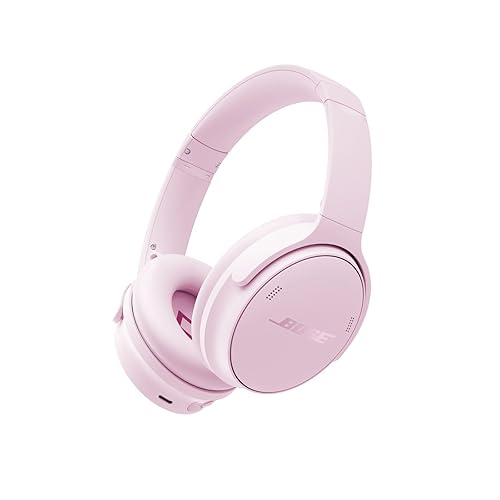
- Bose QuietComfort Headphones: A standard-tier model that suits buyers who prioritize comfort and dependable cancelling. View on Amazon
- Bose QuietComfort Ultra Headphones: The premium tier with spatial audio and refined tuning for immersive listening. View on Amazon
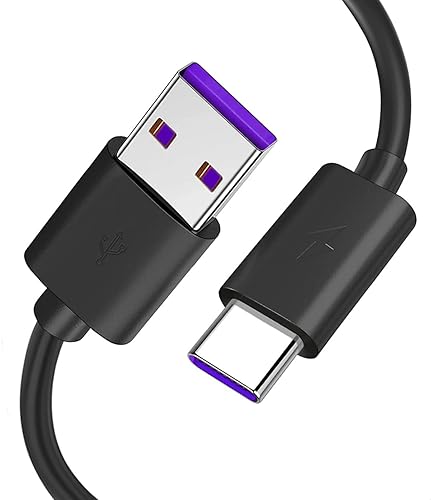
- Bose Wired Cable for QuietComfort Headphones: A spare cable helps when the battery runs low on long trips. View on Amazon
- Hard Carrying Case for Bose QuietComfort Headphones: Protects the headband and ear cups during commuting and travel. View on Amazon
FAQ
Is the Ultra model worth it over the standard QuietComfort?
It depends on your priorities. The Ultra adds spatial audio and more refined tuning, which benefit immersive listening. If you mainly want noise cancelling and comfort, the standard model covers most needs.
Do both models cancel airplane noise well?
Both perform strongly on steady low-frequency cabin hum, which is the core job of active noise cancelling. Differences show up more in busy mixed-sound environments than on a plane.
Can I use either model with a wired connection?
Both generally support a wired option through a 3.5 mm cable, which is useful when the battery is depleted. Confirm the cable type for your specific generation.
Does spatial audio work with any phone?
Spatial audio depends on device, app and content support. Check Bose’s compatibility information before relying on it.
How long do the batteries last?
Battery life is listed in hours with noise cancelling on, and it varies by generation and features used. Use the manufacturer’s stated figure as a baseline and adjust for your habits.
Can I replace the ear cushions if they wear out?
Yes, replacement cushions are commonly available. Worn cushions can reduce the seal and comfort, so replacing them can restore performance.
Should I compare these models to other brands?
Comparing across brands can help, but start with Bose’s own lineup to narrow your choice. Once you know your priorities, you can evaluate alternatives on the same criteria.
Conclusion
The choice between Bose’s standard QuietComfort line and the Ultra tier comes down to priorities. The standard model delivers comfortable, reliable noise cancelling for everyday and travel use, while the Ultra adds premium features and immersive sound for listeners who want more. Confirm the generation, test comfort over time and match the features to your real listening habits. A consult with a hearing professional is worth considering if you listen at high volume for long periods.
Ready to choose one?
About Owen Palmer
Owen Palmer is part of our editorial team and reviews and edits our brand headphones & noise cancelling guides, checking product details against manufacturer specifications and owner feedback.