 By Owen Palmer
Updated November 2026
Choosing bose wireless tv headphones comes down to one practical question: how do you want to hear the TV without disturbing anyone else in the room? Some people want a dedicated transmitter that plugs into the TV and streams audio with minimal delay. Others want a pair of Bose headphones they already use for travel or the gym and simply want to use at home. This guide compares five models across those needs. The selection criteria were specifications, brand reputation, and patterns in owner feedback, with particular attention to audio lag, comfort over long sessions, and how each pair connects to a television. Nothing here reflects personal testing.
Our top picks at a glance
- 1
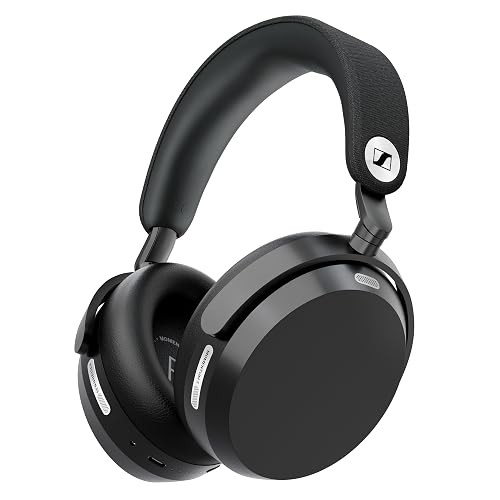
 TOP CHOICEBest overallBose QuietComfort HeadphonesView on Amazon
- 2
 TOP CHOICEBest for dedicated TV listeningSony RF400 Wireless Home Theater HeadphonesView on Amazon
- 3
 TOP CHOICEBest for seniors and hearing supportTV Headphones Wireless for SeniorsView on Amazon
- 4
 Best Bose color optionBose QuietComfort Bluetooth Headphones (Cypress Green)View on Amazon
- 5
 Best budget pickWireless Headphones for TV Watching (Transmitter Charging Base)View on Amazon
Our Top Picks
Quick Comparison
| Product | Best for | Key feature |
|---|---|---|
| Bose QuietComfort Headphones | Bose owners who want one pair for TV and travel | Active noise cancelling and up to 24 hours of playtime |
| Sony RF400 Wireless Home Theater Headphones | Dedicated TV listening from the couch | 150-foot wireless range with RF transmitter |
| TV Headphones Wireless for Seniors | Older listeners and people with hearing loss | Assistive hearing mode and charging dock |
| Bose QuietComfort Bluetooth Headphones (Cypress Green) | Bose buyers who want a distinct color | Deep bass tuning and USB-C charging |
| Wireless Headphones for TV Watching (Transmitter Charging Base) | Plug-and-play setup with a budget-minded approach | Low-latency transmitter with optical, AUX, and RCA inputs |
Bose QuietComfort Headphones
Bose QuietComfort Headphones – Wireless Bluetooth Headphones, Active Over Ear Noise Cancelling and Mic, USB-C Charging, Deep Bass, Up to 24 Hours of Playtime, Black
Best for: One pair of Bose headphones for both TV and everyday use
This suits people who already own Bose gear or want a single pair that covers flights, commutes, and evenings in front of the TV. Connection to a television usually runs over Bluetooth, so the TV or a Bluetooth transmitter must support it. Owners often report that audio lag is noticeable on some TV models, so checking compatibility first matters.
Key specs
- Over-ear design with active noise cancelling
- Built-in microphone
- USB-C charging
- Up to 24 hours of playtime, per the listing
Pros
- Strong noise cancelling for a quieter room
- Long battery life between charges
- Works well as a daily-use pair beyond the TV
Cons
- Bluetooth latency can show up during some TV content
- Costs more than a dedicated TV headset in the same category
Bottom line: Best for people who want Bose sound and noise cancelling and plan to use the headphones well beyond the living room.
Sony RF400 Wireless Home Theater Headphones
SonyRequires use of RCA Audio Out or Headphone Jack on Television, 150 Foot Wireless Range, Up to 20 Hrs of Battery, Comfortable RF400 Wireless Home Theater Headphones for Watching TV WHRF400, Black
Best for: Dedicated TV listening with a long wireless range
This is a home theater headset built around an RF transmitter rather than Bluetooth. It is designed for watching TV from a distance, which makes it a sensible fit for a sofa placed far from the set. The listing states that it needs an RCA audio output or a headphone jack on the television.
Key specs
- 150-foot wireless range, per the listing
- Up to 20 hours of battery life, per the listing
- Requires RCA audio out or headphone jack on the TV
Pros
- Long range suits larger rooms
- Dedicated RF link avoids typical Bluetooth delay
- Simple to use once paired to the transmitter
Cons
- Requires a compatible TV output, which some newer sets lack
- Not designed for carrying outside the home
Bottom line: A strong choice for people who mainly watch TV at home and have a compatible audio output.
TV Headphones Wireless for Seniors
TV Headphones Wireless for Seniors,65H playtime, Bluetooth 6.0, Low Latency,Assistive Hearing, Optical/AUX/RCA, Plug-Play Wireless Headphones for TV with Charging Dock, Gift for Parents and Seniors
Best for: Older listeners and anyone who needs clearer dialogue
This model is aimed at seniors and people with hearing difficulty. Owners often report that the assistive hearing function and the charging dock make it easier to keep the headphones ready each day. The listing mentions Bluetooth 6.0, low-latency operation, and several TV connection options.
Key specs
- 65-hour playtime, per the listing
- Bluetooth 6.0 and low-latency mode, per the listing
- Optical, AUX, and RCA connection options
- Charging dock included
Pros
- Assistive hearing mode aimed at clearer speech
- Charging dock keeps the pair in one place
- Multiple inputs for different TV setups
Cons
- Not a Bose-branded product, so sound profile differs from Bose models
- Bulkier fit than some in-ear or lightweight options
Bottom line: Best for older adults or family members who want simple setup and a dock that stays put.
Bose QuietComfort Bluetooth Headphones (Cypress Green)
Bose QuietComfort Bluetooth Headphones, Wireless Headphones with Active Over Ear Noise Cancelling and Mic, Deep Bass, Up to 24 Hours of Playtime, Cypress Green – Limited Edition
Best for: Bose buyers who want the same core features in a limited color
This is the same QuietComfort line in a limited-edition finish. It suits buyers who like the Bose noise cancelling and comfort profile but want a distinctive look. Connection for TV use again depends on Bluetooth support on the source device.
Key specs
- Active over-ear noise cancelling
- Built-in microphone
- USB-C charging
- Up to 24 hours of playtime, per the listing
Pros
- Familiar Bose comfort and noise cancelling
- Limited color for buyers who want something different
- Good battery endurance for long TV sessions
Cons
- Limited edition finish may be harder to find later
- Bluetooth can introduce lag with some TVs
Bottom line: A good pick for Bose fans who want the same performance as the standard QuietComfort in a specific color.
Wireless Headphones for TV Watching (Transmitter Charging Base)
Wireless Headphones for TV Watching, TV Headphones Wireless for Seniors with Transmitter Charging Base, Over Ear Bluetooth Headphones with No Audio Delay, Plug and Play, Gifts for Parents and Elderly
Best for: Plug-and-play TV listening on a modest setup
This over-ear set comes with a transmitter and charging base, aimed at people who want to connect quickly and skip Bluetooth pairing. It is a practical choice for a secondary TV or a bedroom set. Because it is not a Bose product, buyers should expect a different sound signature.
Key specs
- Transmitter with charging base, per the listing
- Optical, AUX, and RCA connection options, per the listing
- Plug-and-play setup, per the listing
Pros
- Quick setup with the transmitter
- Multiple audio inputs
- Charging base keeps the set ready to use
Cons
- Build and sound may not match Bose-level refinement
- Less suited to travel or use outside the TV
Bottom line: Best for buyers who want an easy, low-fuss TV setup and are not chasing the Bose name.
Buying Guide
Connection type: Bluetooth or RF
Bluetooth headphones are versatile, but many TVs add a noticeable delay between picture and sound. RF transmitters generally reduce that delay and offer longer range. If lip sync matters to you, lean toward a dedicated transmitter or a low-latency mode.
Good picks for this: Sony RF400 Wireless Home Theater Headphones, Wireless Headphones for TV Watching (Transmitter Charging Base)
Check your TV’s audio outputs
Look at the back or side of your TV for optical, RCA, or a headphone jack. Many transmitters need one of these. If your set has only HDMI audio, you may need an adapter or a Bluetooth-capable source.
Good picks for this: TV Headphones Wireless for Seniors, Wireless Headphones for TV Watching (Transmitter Charging Base)
Battery life
Long movies and sports can run past two hours. Check the playtime figure in the listing and note whether it is for the headphones alone or with noise cancelling active. A charging base or USB-C port makes top-ups easier.
Good picks for this: Bose QuietComfort Headphones, TV Headphones Wireless for Seniors
Comfort and fit
Over-ear designs with soft cushions are generally better for long sessions. Adjustable headbands help people with different head sizes. Owners often mention that heavier headsets can cause fatigue after an hour or more.
Good picks for this: Bose QuietComfort Bluetooth Headphones (Cypress Green), Bose QuietComfort Headphones
Noise cancelling versus open listening
Noise cancelling helps block household sounds, which is useful for late-night viewing. Some people prefer open or lightly isolating headphones so they stay aware of the room. Decide which matters more before buying.
Good picks for this: Bose QuietComfort Headphones, Bose QuietComfort Bluetooth Headphones (Cypress Green)
Ease of use and accessibility
For older listeners or people with hearing loss, simple controls, a charging dock, and dedicated hearing features can make a real difference. Volume controls that are easy to find by touch are worth checking.
Good picks for this: TV Headphones Wireless for Seniors, Sony RF400 Wireless Home Theater Headphones
Durability and care
Keep headphones away from heat and moisture, and store them on the charging base or in a case when not in use. Replaceable ear cushions extend the life of over-ear models. Consult the manufacturer’s care instructions for specifics.
Good picks for this: Bose QuietComfort Headphones, Sony RF400 Wireless Home Theater Headphones
FAQ
Can I use Bose wireless headphones with any TV?
Most Bose wireless headphones connect over Bluetooth, so your TV must support Bluetooth audio output or you need a Bluetooth transmitter. Some sets do not offer Bluetooth at all, in which case a transmitter plugged into an optical or RCA output works better.
Why is there a delay between the picture and the sound?
Bluetooth audio adds processing time, which can make dialogue lag behind the picture. Low-latency modes, RF transmitters, or wired-style transmitters reduce the gap. Check the TV’s audio settings for a lip-sync adjustment too.
How far can wireless TV headphones reach?
RF models are often rated for longer ranges than Bluetooth, and the Sony RF400 lists a 150-foot range in its specifications. Walls and obstacles reduce real-world distance, so measure from your seating spot to the transmitter.
Do I need a transmitter for Bose headphones?
Standard Bose Bluetooth headphones usually pair directly to a Bluetooth-enabled source. A transmitter becomes useful when your TV lacks Bluetooth or when you want to reduce lag.
Are noise cancelling headphones good for watching TV?
They can be, especially in busy rooms. Noise cancelling reduces background sound so dialogue stands out. Some listeners find it unnatural for long sessions, so trying it for a full show is worthwhile.
Can I charge the headphones while using them?
Many models can charge over USB-C or on a dock, but whether you can listen while charging depends on the model. Check the manufacturer’s listing or manual before relying on that feature.
Is a Bose model better than a budget TV headset?
Bose models generally offer refined sound and comfort, while budget TV headsets focus on simple setup and multiple inputs. The better choice depends on whether you value audio refinement or easy connectivity most.
Conclusion
For most people looking at bose wireless tv headphones, the right choice depends on connection type and daily use. The Bose QuietComfort Headphones and the Cypress Green edition suit buyers who want Bose noise cancelling and plan to use the pair beyond the TV. The Sony RF400 fits people with a compatible TV output who want a long-range, dedicated listening setup. The TV Headphones Wireless for Seniors suits older listeners who need assistive hearing features and a charging dock. The transmitter-based set is a practical, low-fuss option for a secondary room. Check your TV’s audio outputs first, then match the connection type and comfort needs to the model.
Sources
- Information on hearing loss, assistive listening devices, and hearing health (nidcd.nih.gov)
- Guidance on wireless devices, radio frequency use, and consumer equipment rules (fcc.gov)
- Consumer advice on evaluating product claims and buying electronics (ftc.gov)
Before you buy: helpful guides
Related reading
- Soundlink Around-ear Wireless Headphones Ii Bose Review (2026)
- Bose Wireless Headphones QuietComfort 35 Review: Is It Worth It?
About Owen Palmer
Owen Palmer is part of our editorial team and reviews and edits our brand headphones & noise cancelling guides, checking product details against manufacturer specifications and owner feedback.