
 By Owen Palmer
Updated November 2026
Shoppers looking for a sennheiser profile usb microphone usually want a clean, plug-and-play mic for streaming, podcasting or work calls without buying a full audio interface. This list compares six USB microphones on the criteria that matter most in daily use: connection type, pickup pattern, included accessories, ease of setup and how well each suits voice-focused recording. Each pick is based on product listings, brand reputation and common owner feedback patterns.
Our top picks at a glance
- 1
 TOP CHOICEBest overallSennheiser Professional Profile USB Microphone Streaming Set with BoomView on Amazon
- 2
 TOP CHOICEBest for budget setupsZealSound Podcast Microphone for PC, Noise Cancellation USB Mic with GView on Amazon
- 3
 TOP CHOICEBest for laptop useFIFINE Metal Cardioid Laptop Mic K669B USB MicrophoneView on Amazon
- 4
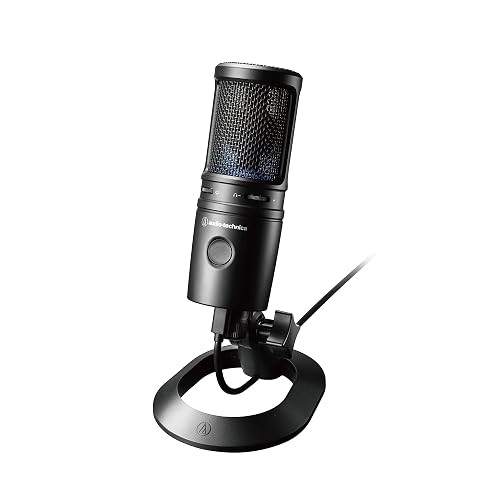 Best for studio-style vocalsAudio-Technica AT2020USB-X Cardioid Condenser USB MicrophoneView on Amazon
- 5
 Best for podcast voiceAudio-Technica AT2040USB Dynamic USB MicrophoneView on Amazon
- 6
 Best for conference callsTONOR Omnidirectional Condenser Mic with 190 cm Cable G11View on Amazon
Our Top Picks
| Product | Best for | Key feature |
|---|---|---|
| Sennheiser Professional Profile USB Microphone Streaming Set | Streaming and podcasting | Boom arm and USB-C cable |
| ZealSound Podcast Microphone | Budget setups | Gain and mute controls |
| FIFINE Metal Cardioid Laptop Mic K669B | Laptop use | Cardioid pickup pattern |
| Audio-Technica AT2020USB-X | Studio-style vocals | 24-bit, headphone jack |
| Audio-Technica AT2040USB | Podcast voice | Dynamic capsule for rooms |
| TONOR Omnidirectional Condenser Mic G11 | Conference calls | Omnidirectional pickup, 190 cm cable |
Sennheiser Professional Profile USB Microphone Streaming Set with Boom Arm, 3 m USB-C Cable & Mic Pouch
Sennheiser Professional Profile USB Microphone Streaming Set with Boom Arm, 3 m USB-C Cable & Mic Pouch
Best for: Streaming and podcasting setups that need a stable desk mount. Worth reading next: 6 Best Sennheiser Profile USB Mic Options Compared (2026).
This suits creators who want a complete kit with a boom arm and a longer USB-C cable so the mic can be positioned close to the mouth without extra parts.
Pros:
- Includes a boom arm and 3 m USB-C cable
- Carry pouch makes it easy to move between locations
Cons:
- Full kit takes more desk space than a stand-only mic
ZealSound Podcast Microphone for PC, Noise Cancellation USB Mic with Gain, Volume Adjustment & Mute Button
ZealSound Podcast Microphone for PC, Noise Cancellation USB Mic with Gain, Volume Adjustment & Mute Button, Monitoring & Echo, for YouTube, TikTok, Podcasting, Streaming, iPhone, iPad, Android, Mac
Best for: Budget setups with basic recording and call needs.
This works for beginners who want on-mic gain and mute controls and are recording in a quiet room.
Pros:
- Onboard gain and volume adjustment
- Works across PC, Mac and mobile devices
Cons:
- Noise cancellation is less effective in loud rooms
FIFINE Metal Cardioid Laptop Mic K669B USB Microphone
FIFINEMetal Cardioid Laptop Mic for MAC OS, Windows, Voice Overs, Streaming, Online Meeting and YouTube Videos K669B USB Microphone, Condenser Recording Mic for Vocals, Meeting
Best for: Laptop use and online meetings.
This fits users who record at a desk and want a cardioid pattern to reduce background noise from behind the mic.
Pros:
- Cardioid pattern rejects sound from the rear
- Metal build feels sturdy on a desk
Cons:
- Stand and shock mount are sold separately on some listings
Audio-Technica AT2020USB-X Cardioid Condenser USB Microphone
Audio-Technica24-bit/96 kHz sampling rate, USB-C output, mute button, headphone jack, podcasting, streaming, recording AT2020USB-X Cardioid Condenser USB Microphone
Best for: Studio-style vocals with clear detail.
This suits singers and voiceover recordists who want a condenser sound and a headphone jack for zero-latency monitoring.
Pros:
- 24-bit/96 kHz sampling with USB-C output
- Headphone jack and mute button on the mic
Cons:
- Condenser capsules pick up more room noise than dynamic mics
Audio-Technica AT2040USB Dynamic USB Microphone
Audio-Technica AT2040USB Dynamic USB Microphone
Best for: Podcast voice in untreated rooms.
Dynamic mics reject more ambient noise, so this suits people recording in a spare bedroom or home office.
Pros:
- Dynamic capsule rejects much room noise
- Plug-and-play USB connection
Cons:
- Needs closer mouth distance for the best level
TONOR Omnidirectional Condenser Mic with 190 cm Cable G11
TONOROmnidirectional Condenser Mic with 190 cm/74inch Cable, Plug&Play, Desktop PC & Laptop for Teleconference, Court Reporter Conference Microphone for PC, USB Microphone for Win & Mac, G11
Best for: Conference calls and multi-person tables.
This works for meeting rooms or court-reporter style setups where several voices need to be picked up from a central point.
Pros:
- Omnidirectional pattern picks up nearby voices
- 190 cm cable gives flexible placement
Cons:
- Picks up more background noise than a cardioid mic
Buying Guide
Connection type
USB microphones plug straight into a computer, but the cable type matters. Many owners report that USB-C is the most future-proof choice for newer laptops.
FAQ
Is the Sennheiser Profile USB microphone good for beginners?
Yes, the Sennheiser Profile is a straightforward plug-and-play option that works without drivers or extra hardware. Its included boom arm and USB-C cable make the initial setup simple for people who are new to recording.
Do I need an audio interface to use a USB microphone?
No, a USB microphone connects directly to your computer and handles the analog-to-digital conversion internally. An audio interface only becomes useful if you later want XLR microphones or more advanced multi-track recording.
What is the difference between a condenser and a dynamic USB microphone?
Condenser microphones are more sensitive and capture detail well, which suits quiet rooms and studio-style voice work. Dynamic microphones reject more background noise and handle loud sources better, so they are often a good match for untreated spaces.
Which pickup pattern is best for a home office or podcast?
A cardioid pattern is usually the best choice because it focuses on the sound in front of the mic and reduces noise from behind. Omnidirectional mics pick up sound from all directions, which can be useful for group meetings or conference calls.
Can I use these microphones with a phone or tablet?
Some USB microphones support iPhone, iPad, and Android devices, while others are designed mainly for Windows and Mac computers. Check the compatibility details in each product listing and confirm that your device supports USB audio input before buying.
Do I need to install special software to use a USB microphone?
Most USB microphones are plug-and-play and work with the built-in audio settings on your operating system. Some models offer optional companion software for adjusting gain, monitoring, or sampling settings, but it is not always required.
Conclusion
If you want an all-in-one setup with a boom arm and a clean studio sound for streaming or podcasting, the Sennheiser Profile set is a strong pick. Budget-minded buyers who mainly need a simple mic for calls or basic voiceovers may find the smaller USB options more than sufficient.
For a dedicated recording setup, the Audio-Technica condenser and dynamic models offer more control over tone and background noise, while the omnidirectional TONOR suits group meetings and conference rooms. Match the pickup pattern and connection type to your room and your main use, and the right choice will follow.
Related reading
- Sennheiser Microphone MKE 600: Setup, Placement and Fixes (2026)
- Sennheiser MD 421-II Microphone Review: Features and Performance
- Sennheiser MD 421 Microphone Review: Features and Performance
- Sennheiser Evolution E835 Microphone: Setup, Placement and Fixes (2026)
- Sennheiser #Microphone MKH 416 Review: Features and Performance
- Sennheiser Open Back Headset: How to Choose the Right Model (2026)
About Owen Palmer
Owen Palmer is part of our editorial team and reviews and edits our brand headphones & noise cancelling guides, checking product details against manufacturer specifications and owner feedback.


