
 By Owen Palmer
Updated November 2026
Resetting Bose QuietComfort headphones usually means clearing old Bluetooth pairings, restoring factory settings or fixing a connection that won’t behave. How easy that is depends a lot on the exact model, its generation and whether it has earbuds or a sport design. This guide compares six current QuietComfort listings on Amazon US, using manufacturer specifications, brand reputation and common owner feedback as the selection criteria. Each pick is matched to a specific need, so you can see which model fits your listening habits and how it fits into a reset or pairing routine.
Our top picks at a glance
- 1
 TOP CHOICEBest overallBose QuietComfort Headphones (2nd Gen) – Wireless Headphones, Active OView on Amazon
- 2
 TOP CHOICEBest for premium noise cancellingBose QuietComfort Ultra Bluetooth Headphones (2nd Gen), Wireless HeadpView on Amazon
- 3
 TOP CHOICEBest for a budget pickAmazon Renewed QuietComfort Wireless Noise Cancelling Headphones, BlueView on Amazon
- 4
 Best for a certified renewed optionWireless Bluetooth Headphones, Active Over Ear Noise Cancelling and MiView on Amazon
- 5
 Best for switching between earbuds and headphonesBoseQuietComfort Headphones 2nd Gen with Earbuds in Dewdrop MintView on Amazon
- 6
 Best for workoutsBoseQuietComfort with Sport Open Earbuds in White and BlackView on Amazon
Our Top Picks
The table below gives a quick overview. Read the individual sections for the reset and pairing details that apply to each design.
| Product | Best for | Key feature |
|---|---|---|
| Bose QuietComfort Headphones (2nd Gen) | Everyday listening and calls | Active noise cancelling with USB-C charging |
| Bose QuietComfort Ultra Bluetooth Headphones (2nd Gen) | Premium noise cancelling and spatial audio | Spatial audio with up to 30 hours of playtime |
| Amazon Renewed QuietComfort Wireless Noise Cancelling Headphones | Budget-minded buyers | Up to 24 hours of battery life |
| Bose Wireless Bluetooth Headphones (Certified Renewed) | Buyers who prefer renewed units | Deep bass with USB-C charging |
| Bose QuietComfort Headphones 2nd Gen with Earbuds | Switching between in-ear and over-ear use | Included earbuds alongside the headphones |
| Bose QuietComfort with Sport Open Earbuds | Running and outdoor activity | Open-ear design for awareness of surroundings |
Bose QuietComfort Headphones (2nd Gen) – Wireless Headphones, Active Over Ear Noise Cancelling and Mic, Immersive Audio, USB-C Charging and Lossless Audio, Up to 24 Hours of Play time, Dewdrop Mint
Bose QuietComfort Headphones (2nd Gen) – Wireless Headphones, Active Over Ear Noise Cancelling and Mic, Immersive Audio, USB-C Charging and Lossless Audio, Up to 24 Hours of Play time, Dewdrop Mint
Best for: Best overall for everyday listening
This is a strong fit for listeners who want a straightforward over-ear model with active noise cancelling, a built-in mic for calls and simple Bluetooth pairing. It suits people who will reset the headphones only occasionally, usually after moving them to a new phone.
Key specs
- Active over-ear noise cancelling
- Built-in microphone for calls
- USB-C charging
- Up to 24 hours of playtime per the listing
- Lossless audio support as named in the listing
Pros
- USB-C charging matches most current phones and laptops
- Noise cancelling covers common commute and office noise
- Battery life is long enough for multi-day use between charges
Cons
- Lacks the spatial audio features of the Ultra line
- Pairing and reset steps can differ slightly from older QuietComfort models, so check the manual
Bottom line: A sensible default for most buyers who want reliable noise cancelling without paying for premium extras.
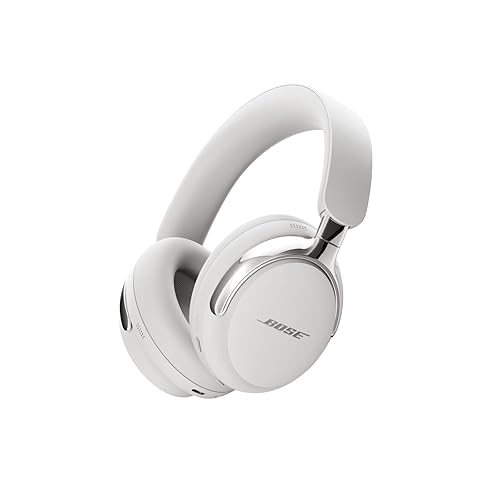
Bose QuietComfort Ultra Bluetooth Headphones (2nd Gen), Wireless Headphones with Spatial Audio, Over Ear Noise Cancelling with Mic, Up to 30 Hours of Play time, White Smoke
Bose QuietComfort Ultra Bluetooth Headphones (2nd Gen), Wireless Headphones with Spatial Audio, Over Ear Noise Cancelling with Mic, Up to 30 Hours of Play time, White Smoke
Best for: Best for premium noise cancelling
This model is aimed at listeners who want the top-tier version of the QuietComfort line, including spatial audio and longer playtime. It fits buyers who use the headphones daily and expect a more polished feature set.
Key specs
- Spatial audio support as named in the listing
- Active over-ear noise cancelling with a built-in mic
- Up to 30 hours of playtime per the listing
- Bluetooth wireless connectivity
Pros
- Longest playtime in this comparison, according to the listing
- Spatial audio adds a different listening experience for films and music
- Strong fit for long travel days
Cons
- Higher-end positioning means it is not the choice for strict budgets
- Multiple pairing profiles can make resets a little more involved, so keep track of paired devices
Bottom line: Best for listeners who want the most features in the QuietComfort family and use the headphones heavily.
Amazon Renewed QuietComfort Wireless Noise Cancelling Headphones, Bluetooth Over Ear Headphones with Up to 24 Hours of Battery Life, White Smoke (Renewed)
Amazon Renewed QuietComfort Wireless Noise Cancelling Headphones, Bluetooth Over Ear Headphones with Up to 24 Hours of Battery Life, White Smoke (Renewed)
Best for: Best budget pick
This renewed listing suits buyers who want QuietComfort noise cancelling at a lower entry point. It works well for students and occasional travelers who are comfortable with a refurbished unit.
Key specs
- Bluetooth over-ear design
- Noise cancelling as listed
- Up to 24 hours of battery life per the listing
Pros
- Good value for buyers focused on noise cancelling basics
- Long battery life for a renewed unit
- Familiar Bose pairing workflow
Cons
- Renewed condition means cosmetic wear is possible
- Older firmware may need an update before a clean reset
Bottom line: A practical choice if you want QuietComfort performance and accept renewed condition in exchange for a lower cost.
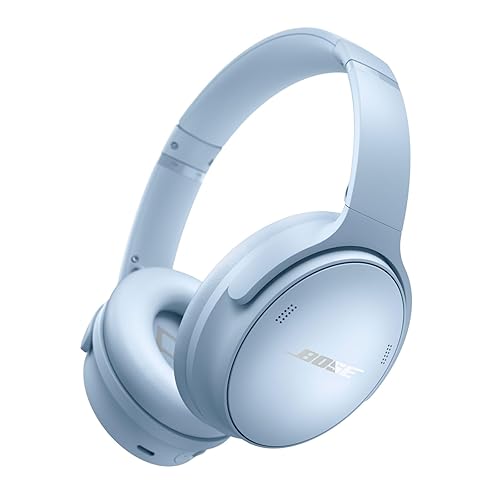
Bose Wireless Bluetooth Headphones, Active Over Ear Noise Cancelling and Mic, USB-C Charging, Deep Bass, Up to 24h of Playtime (Certified Renewed) QuietComfort Headphones, Moonstone Blue
Wireless Bluetooth Headphones, Active Over Ear Noise Cancelling and Mic, USB-C Charging, Deep Bass, Up to 24h of Playtime Bose (Certified Renewed) QuietComfort Headphones, Moonstone Blue
Best for: Best for a certified renewed option
This listing is for buyers who want a certified renewed unit with USB-C charging and deep bass. It fits people who prefer a standard Bose design but want a lower-cost route to ownership.
Key specs
- Active over-ear noise cancelling with mic
- USB-C charging
- Up to 24 hours of playtime per the listing
Pros
- USB-C charging simplifies cable management
- Certified renewed status suggests inspection and testing by the seller
- Deep bass tuning suits bass-forward listeners
Cons
- Renewed units may show light signs of prior use
- Reset history on a used unit is worth clearing before first pairing
Bottom line: Good for buyers who want a Bose-branded, USB-C model and are comfortable with certified renewed stock.
BoseQuietComfort Headphones 2nd Gen with Earbuds in Dewdrop Mint
BoseQuietComfort Headphones 2nd Gen with Earbuds in Dewdrop Mint QuietComfort Headphones 2nd Gen with Earbuds (Dewdrop Mint)
Best for: Best for switching between earbuds and headphones
This bundle suits people who want both a full over-ear headphone and a set of earbuds for different situations. Owners who carry one device for the gym and another for the office may find the flexibility useful.
Key specs
- Over-ear QuietComfort 2nd Gen headphones
- Included earbuds in the same color family
- Bluetooth wireless connectivity
Pros
- Two form factors in one package
- Matching color for a coordinated look
- Useful backup if one set needs a reset
Cons
- Two devices mean two charging routines and two pairing processes
- Owners may need to reset each device separately when troubleshooting
Bottom line: A good pick for listeners who want headphones and earbuds from the same family.
BoseQuietComfort with Sport Open Earbuds in White and Black
BoseQuietComfort with Sport Open Earbuds in White and Black QuietComfort with Sport Open Earbuds (White and Black)
Best for: Best for workouts
This open-ear design suits runners and cyclists who need to hear traffic and their surroundings. It is a different product type from the over-ear models, so the reset steps and fit considerations are not the same.
Key specs
- Open-ear sport design
- Bluetooth wireless connectivity
- Available in white and black
Pros
- Open-ear fit keeps ambient sound audible
- Lightweight design suits extended wear
- Good for outdoor safety awareness
Cons
- Open-ear design offers less isolation than noise-cancelling over-ear models
- Fit and seal vary by ear shape, so trial wear is recommended
Bottom line: Best for active listeners who want to hear their surroundings while exercising.
Buying Guide
Model generation and design
Resetting steps differ between generations and between over-ear, in-ear and open-ear designs. Check the model name and generation before following any instructions. Our reset guide, How to Reset Bose QuietComfort Headphones: 3 Steps That Work (2026), covers the general approach, while Compare Bose QuietComfort Headphones: Which Model Is Right for You? (2026) helps you match a model to your needs.
Good picks for this: Bose QuietComfort Headphones (2nd Gen), Bose QuietComfort Ultra Bluetooth Headphones (2nd Gen)
Noise cancelling performance
Active noise cancelling is the main reason many buyers choose QuietComfort models. Think about where you will use the headphones: on a train, in an office or on a flight. Stronger noise cancelling helps most in steady, low-frequency sounds like engines and fans.
Good picks for this: Bose QuietComfort Ultra Bluetooth Headphones (2nd Gen), Bose QuietComfort Headphones (2nd Gen)
Battery life and charging
Check the playtime figure in the listing and the charging port type. USB-C charging is more convenient for most current devices. Battery life matters most for travel and all-day use, and it also affects how often you need to reset or re-pair after a drained battery.
Good picks for this: Bose QuietComfort Ultra Bluetooth Headphones (2nd Gen), Bose Wireless Bluetooth Headphones (Certified Renewed)
Fit and comfort
Over-ear headphones need a snug seal without clamping too hard, while earbuds depend on ear shape. Try to wear the headphones for at least 30 minutes before deciding. If you wear glasses, check how the arms sit against the ear cups.
Good picks for this: Bose QuietComfort Headphones (2nd Gen), Bose QuietComfort with Sport Open Earbuds
Intended use case
Think about your main activity. Commuting and office work favor noise cancelling over-ear designs. Running and cycling favor open-ear sport designs that keep traffic audible. Mixed users may prefer a bundle that includes both formats.
Good picks for this: Bose QuietComfort with Sport Open Earbuds, Bose QuietComfort Headphones 2nd Gen with Earbuds
Renewed versus new condition
Renewed and certified renewed listings can offer a lower entry point, but condition varies. Read the seller’s description for cosmetic grading and return terms. Before first pairing, clear any old pairings and consider a factory reset. Our guide on How to Factory Reset Bose QuietComfort Headphones: 4 Steps (2026) explains how.
Good picks for this: Amazon Renewed QuietComfort Wireless Noise Cancelling Headphones, Bose Wireless Bluetooth Headphones (Certified Renewed)
Pairing and reset workflow
If you plan to switch between phones, laptops or tablets, a model with simple pairing is worth more than extra features. Keep a note of the pairing steps for your specific model. How to Put Bose QuietComfort Headphones in Pairing Mode: 3 Steps (2026) and How to Pair Bose QuietComfort Headphones: 4 Simple Steps (2026) are useful references.
Good picks for this: Bose QuietComfort Headphones (2nd Gen), Bose QuietComfort Headphones 2nd Gen with Earbuds
FAQ
How do I reset Bose QuietComfort headphones?
Most QuietComfort models can be reset by turning them off, then holding the power button and the Bluetooth button together until the indicator flashes or sounds a tone. The exact method varies by model, so check the manual for your generation. Our step-by-step guide, How to Reset Bose QuietComfort Headphones: 3 Steps That Work (2026), walks through the common approach.
What is the difference between a reset and a factory reset?
A standard reset usually restarts the headphones and can clear a stuck connection. A factory reset restores default settings and removes stored pairings. Use a factory reset when the headphones will not pair or when you are giving them to someone else.
Why won’t my QuietComfort headphones connect after a reset?
Common causes include the headphones still being paired to another device, low battery, or an outdated phone Bluetooth list. Forget the headphones on your phone, charge them fully and try pairing mode again.
Do I need to reset my headphones before selling or giving them away?
Yes. A factory reset removes pairings and personal settings. It also makes sure the next owner can pair the headphones without issues.
Does resetting affect the noise cancelling or battery health?
A reset does not change the hardware. It restores software settings. Battery health depends on charging habits and age, not on resetting.
Which model is easiest to reset?
Ease depends more on your phone and how many devices you have paired than on the model alone. Newer QuietComfort generations with USB-C often follow a similar workflow, but always confirm the steps in the manual for your specific headphones.
Conclusion
Resetting Bose QuietComfort headphones is straightforward once you know your model and generation. The Bose QuietComfort Headphones (2nd Gen) is a practical default for everyday use. The Bose QuietComfort Ultra Bluetooth Headphones (2nd Gen) suits buyers who want the most features and longest playtime. Renewed options can work for budget-minded buyers who accept used condition. The earbud bundle and the open-ear sport model fit listeners with mixed or active lifestyles. Always check the manual for your exact model before starting a reset, and clear old pairings before handing the headphones to someone else.
Sources
- Rules and guidance on wireless devices and Bluetooth equipment sold in the United States (fcc.gov)
- Consumer advice on buying refurbished and renewed electronics (ftc.gov)
- Standards and research on Bluetooth and wireless audio technology
About Owen Palmer
Owen Palmer is part of our editorial team and reviews and edits our brand headphones & noise cancelling guides, checking product details against manufacturer specifications and owner feedback.


