By Owen Palmer
Updated November 2026
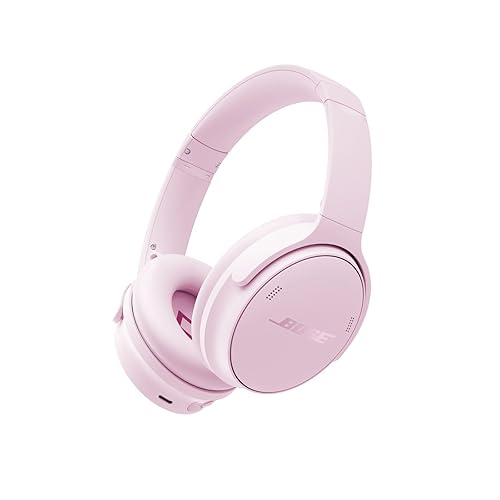
The Bose QC25 QuietComfort 25 acoustic noise cancelling headphones are an over-ear-style headset that uses an audio cable and a small battery-powered noise cancelling module. This guide walks you through identifying your exact model, setting it up correctly, checking fit and cable connections, and troubleshooting the problems owners report most often. By the end, you should know whether your pair is working as designed and what to do if it isn’t.
Identify Your Bose QC25 Model and Generation
Before troubleshooting, confirm you actually have a QC25. Bose sold several QuietComfort headphones over the years, and the names are easy to mix up. The QC25 is the model with a detachable cable and an inline control module, and it is designed for both wired use and active noise cancelling. If your pair has built-in Bluetooth and a rechargeable battery as its main power source, you are likely looking at a newer QuietComfort model rather than the QC25. For a broader look at the family, see Bose QuietComfort QC25 Noise Cancelling Headphones: Model Guide, Fixes and Tips.
Check the following on your headset:
- The model name printed on the headband or the earcup label.
- The presence of a detachable 3.5 mm cable with a short inline control box.
- A small slide switch or power button on the noise cancelling module.
- The battery compartment, which typically takes a single AAA alkaline battery.
If you own a different Bose model, the troubleshooting steps below may not apply. A comparison article such as Bose Quietcomfort Headphones vs Sony Wh-1000xm5 (2026): Which Should You Choose? can help if you are still deciding between options.
Set Up the Headphones Step by Step
Proper setup takes only a few minutes, but skipping a step is the most common reason people think their headphones are broken.
- Insert one fresh AAA alkaline battery into the battery compartment on the cable control module, matching the polarity marks inside the compartment.
- Plug the detachable cable firmly into the earcup jack until it seats fully. A loose fit can cause one side to drop out.
- Connect the other end of the cable to your device’s 3.5 mm headphone jack or to an adapter if your device has no jack.
- Turn the noise cancelling switch on the control module to the on position.
- Play a track with a steady bass line and confirm that low-frequency background noise, such as a fan or air conditioner, is reduced.
Noise cancelling should be active only when the battery is installed and the switch is on. With the switch off, the headphones function as passive headphones, which is the expected behavior.
Checking Battery and Power
Noise cancelling draws power from the battery, so a weak battery is a frequent cause of reduced performance. Replace the battery with a fresh one if you notice hissing that gets louder over time, a noticeable drop in noise reduction, or a complete loss of the effect. Remove the battery when you store the headphones for an extended period to prevent corrosion.
Confirming the Cable Connection
Wiggle the cable at both ends while music is playing. If the sound cuts in and out, the problem is likely a worn cable or a loose jack. Try a different cable if you have one, since the cable is detachable.
Check Fit and Comfort for Better Noise Reduction
Passive isolation from the ear cushions works together with the active noise cancelling circuitry. A poor seal reduces the effect noticeably, even when the battery is fresh.
Adjust the headband so the earcups sit flat around your ears without pressing hard on the cartilage. The ear cushions should form a continuous seal. Glasses with thick arms, hair under the cushions, or a loose headband can all weaken the seal. Owners often report that small position adjustments make a larger difference than any setting on the headphones themselves.
| Symptom | Likely Cause | First Step |
|---|---|---|
| Low noise reduction | Weak or missing battery, or switch off | Install a fresh AAA battery and confirm the switch is on |
| Audio cuts out when cable moves | Loose or damaged cable | Reseat the cable and test with another cable |
| Hiss in the earcups | Normal noise cancelling circuit noise or a low battery | Check the battery level and reduce source volume |
| Sound in one earcup only | Cable not fully seated or a damaged wire | Push the plug in fully and inspect the cable |
Troubleshoot Common Problems
Most QC25 issues come down to power, connections or fit. Work through the steps in order, since the first two checks solve most complaints.
No Sound at All
Confirm the cable is plugged into the headphone jack and not a line-out port, and that your device volume is raised. Test the headphones on a second device to rule out a source problem.
Ringing or Pressure Sensation
Some listeners notice a slight pressure or a faint ringing when noise cancelling is active. This is a known characteristic of the technology, and it usually fades within a few minutes. If it persists, switch the noise cancelling off and test again. Consult a healthcare professional if you have ongoing ear discomfort, pain or hearing changes.
Distortion at High Volume
Turn down the source volume before adjusting the headphones. Distortion at high volume often comes from the source device pushing the signal too hard rather than from the headphones themselves.
Recommended gear
A few basic items make ownership easier and help keep the headphones working well for years.
- Fresh AAA alkaline batteries keep the noise cancelling module working at full strength, and keeping a spare avoids interruptions on a long trip. View on Amazon
- A replacement 3.5 mm audio cable lets you swap out a worn cable without replacing the whole headset. View on Amazon
- A hard carrying case protects the earcups and cable from crushing and keeps the cable from tangling in a bag. View on Amazon
Tips and Common Mistakes
- Do not leave the battery in long-term storage, since leaking batteries can damage the module.
- Do not assume the headphones are faulty before testing a fresh battery and a second cable.
- Do not expect full silence from noise cancelling. It reduces steady, low-frequency sounds most effectively, while sudden high-pitched noises still come through.
- Keep the cable away from pets and from sharp corners, since the connection points wear over time.
- If you use the headphones on flights, carry a spare battery. Many owners find that the noise cancelling effect is most valuable during long trips where engine noise is constant.
For readers who compare the QC25 with newer options, Bose QuietComfort Ultra Noise Cancelling Headphones Review: Is It Worth It? covers how the newer design differs in comfort and connectivity.
FAQ
Do the Bose QC25 headphones need a battery to play music?
No. You can use them passively with the noise cancelling switch off, though you will lose the noise reduction. Noise cancelling requires the AAA battery and the switch set to on.
What type of battery do the QC25 headphones use?
They use a single AAA alkaline battery in the cable control module, according to the standard Bose specification for this model.
Can I use the QC25 headphones with a phone that has no headphone jack?
Yes, with a suitable USB-C or Lightning adapter that provides an analog 3.5 mm output. Audio quality and compatibility depend on the adapter.
Why does my QC25 sound quieter than before?
A weakening battery, a loose cable connection or a worn ear cushion seal are the most common causes. Check each in that order.
Is the noise cancelling effect the same as earplugs?
No. Noise cancelling works best on steady, low-frequency sounds like engine rumble, while earplugs block a broader range of sounds. The two are different tools.
Can I replace the ear cushions on the QC25?
Replacement ear cushions are available for many Bose models. Check that the replacement is designed for your specific QC25 earcup size before buying.
Does the QC25 have Bluetooth?
The QC25 is a wired model designed around the detachable audio cable. If you need wireless listening, a newer QuietComfort model is a better fit.
Should I see a professional about ear discomfort from the headphones?
Yes. If you experience persistent pain, ringing, pressure or any change in hearing, consult a doctor or audiologist rather than relying on troubleshooting alone.
Conclusion
The Bose QC25 QuietComfort 25 acoustic noise cancelling headphones work reliably when the battery is fresh, the cable is seated fully, and the ear cushions form a proper seal. Start with power and connections, then check fit before assuming a defect. Keep spare parts on hand, and revisit the model guide if you need help identifying your exact pair.
Related reading
- Bose QuietComfort SC Noise Cancelling Headphones: Model Guide and Fixes (2026)
- Bose QuietComfort 35 Wireless Headphones Noise Cancelling Review (2026)
- Sony Versus Bose Noise Cancelling Headphones: Which Fits You Best (2026)
Ready to choose one?
About Owen Palmer
Owen Palmer is part of our editorial team and reviews and edits our brand headphones & noise cancelling guides, checking product details against manufacturer specifications and owner feedback.