By Owen Palmer
Updated November 2026
To turn off most Bose QuietComfort (QC) headphones, press and hold the power button until you hear the power-down tone or see the indicator light go out. The exact press length and button location depend on your model, so this guide walks through each common method, including the auto-off settings that can shut the headphones down for you. You will also find out what to do when the headphones seem stuck on.
Before You Start: Identify Your Model
Bose has produced several QC lines over the years, and the power controls differ slightly between them. Before you press anything, confirm which model you own. The model name is printed on the inside of the headband or on the box, and it usually appears in the Bose Music app once the headphones are connected.
Shopping for one? See our guide: 7 Best Bose QC SE Headphones of 2026: Buyer's Guide.
The main families you are likely to encounter are:
- QuietComfort 35 series (II and earlier variants): a dedicated power slider on the right ear cup, with Bluetooth pairing on the same switch.
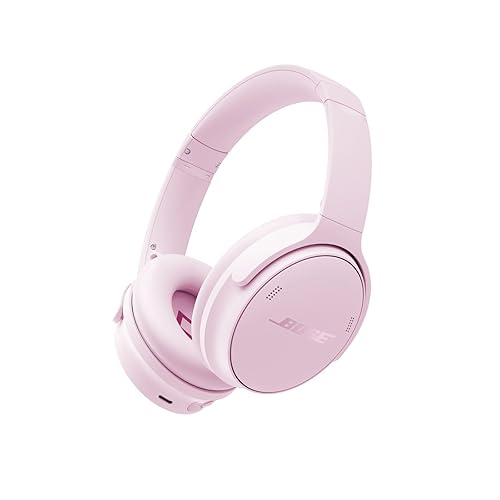
- QuietComfort 45 and QuietComfort Headphones (2023 and later): a single power button on the right ear cup, paired with the noise cancelling and action buttons.
- QuietComfort Ultra Headphones: a power button on the right ear cup, along with touch controls on the same cup for volume and playback.
If you own an older Bose model, a related guide on Bose Headphones Older Models: How to Identify, Compare and Maintain Them can help you confirm its generation. Knowing the generation tells you which power method applies.
Method 1: Use the Power Button or Slider
This is the most direct way to turn off Bose QC headphones, and it works on nearly every model.
- Locate the power control on the right ear cup. On QC35 models it is a sliding switch. On QC45, QC Headphones and QC Ultra models it is a round power button.
- For the sliding switch, move it from ON to OFF. You will see the indicator light go out.
- For the round button, press and hold it for about two to three seconds. Wait for the power-down voice prompt or tone. This is the cue that the headphones are shutting off.
- Remove the headphones from your head or set them down. Confirm the light is off before walking away.
If you press the button but nothing happens, the headphones may already be off, or the battery may be too low to respond. Try plugging them into a USB-C cable for ten minutes and then repeating the step.
Method 2: Use the Auto-Off Timer
Bose headphones include an automatic power-off feature that shuts the unit down after a set period of inactivity. This saves battery when you fall asleep or forget to switch them off. The auto-off timer is controlled through the Bose Music app, not through the headphones themselves.
- Install the Bose Music app on your phone and open it while the headphones are connected.
- Tap the headphones name or the settings icon to open the device menu.
- Look for the Auto-Off or Power Management setting. Choose a time, such as 20 minutes, 1 hour or never.
- Confirm your choice and test it by leaving the headphones idle for the selected interval.
Manufacturers specify that auto-off only triggers when the headphones are not playing audio or receiving input. If you are streaming silence, the timer may not engage, so check the app setting first if your headphones stay on too long.
Method 3: Turn Off Through Your Phone’s Bluetooth Settings
Disconnecting the headphones does not turn them off, but it does stop the drain caused by an active connection. If you want to save battery quickly without powering down, disconnect from your phone’s Bluetooth menu. The headphones will go into standby and draw very little power. To fully power down, still use Method 1 or 2 afterward.
Method 4: Use the Bose Music App to Power Off
Some models let you power down from inside the app. Open the device screen in the Bose Music app and look for a power option. This is useful when the headphones are in a case or bag and you cannot reach the physical button. Not every model supports this, so if you do not see the option, rely on the physical control instead.
Comparing the Power-Off Methods
| Method | Best for | What it does | Needs app? |
|---|---|---|---|
| Power button or slider | Everyday switch-off | Fully powers down the headphones | No |
| Auto-off timer | Forgetful users, overnight | Powers down after inactivity | Yes, one-time setup |
| Bluetooth disconnect | Quick battery save | Ends connection, not power | No |
| App power option | Headphones in a case | Powers down remotely | Yes, on supported models |
What to Do If the Headphones Won’t Turn Off
Occasionally the headphones will ignore the power button. The usual causes are a stuck connection, a firmware hiccup or a low battery. Work through these steps in order:
- Disconnect the headphones from all paired devices using your phone’s Bluetooth menu.
- Hold the power button for about 10 to 15 seconds. This forces a restart on many models.
- Connect the headphones to power with the USB-C cable for at least 15 minutes, then try the power button again.
- Check for a firmware update in the Bose Music app. Outdated firmware sometimes causes unusual behavior.
- If the headphones still will not respond, contact Bose support. They can advise on warranty or repair options.
If your headphones have a damaged button or a swollen battery, stop using them and seek service rather than trying to open the housing yourself.
Tips for Reliable Power Management
- Keep the Bose Music app installed so you can change the auto-off timer whenever you need to.
- Charge the headphones regularly. A battery that drops very low may behave unpredictably.
- Store the headphones in their case after switching them off to protect the controls from accidental presses.
- Update firmware when prompted. Power behavior sometimes improves with updates.
- If you use the headphones with a laptop or TV, remember that the device may stay connected even after you stop listening. Disconnect or power off after each session.
Common Mistakes
- Confusing disconnect with power off. Disconnecting from your phone does not turn the headphones off. They will keep a standby state.
- Tapping instead of holding. On models with a round power button, a quick tap often does nothing. Hold it until you get the audio cue.
- Ignoring the auto-off setting. Many people assume the headphones shut down on their own, then find a drained battery the next morning. Check the timer once and forget about it.
- Using the wrong model guide. QC35 and QC45 controls differ. Confirm your model before following instructions.
Recommended gear
A few accessories can make turning off and storing your headphones easier, especially if you travel often.
- A hard protective case: keeps the ear cups and controls from being pressed accidentally in a bag. View on Amazon
- A USB-C charging cable: useful for the reset and charge steps if your battery runs low. View on Amazon
- A replacement battery kit for older headphones: helpful if the battery no longer holds a charge and the unit shuts down unexpectedly. View on Amazon
For a wider look at protective options, see How to Select a Protective Headphone Case.
FAQ
How long do I hold the button to turn off Bose QC headphones?
On QC45, QC Headphones and QC Ultra models, hold the power button for about two to three seconds until you hear the power-down prompt. On QC35 models, slide the switch to OFF.
Do Bose QC headphones turn off automatically?
Yes, if the auto-off timer is enabled in the Bose Music app. The timer shuts the headphones down after a set period of inactivity. Check the setting, since it is not always on by default.
Does disconnecting Bluetooth turn off the headphones?
No. Disconnecting ends the link to your device but leaves the headphones powered on in standby. You still need to use the power control to switch them fully off.
Why won’t my Bose headphones turn off?
The most common causes are a stuck Bluetooth connection, a low battery or outdated firmware. Disconnect from all devices, perform a forced restart by holding the power button for 10 to 15 seconds, and charge them before trying again.
Can I turn off Bose headphones from the app?
Some models support a power-off option inside the Bose Music app. If you do not see it, use the physical power button or slider.
How do I know the headphones are actually off?
The indicator light goes out, and you hear the power-down tone or voice prompt. If the light stays on or a voice prompt plays, the headphones are still active.
Does turning off the headphones save battery?
Yes. A powered-off unit draws essentially no battery. Standby still uses a small amount, so switching fully off is better for long storage. For guidance on pairing with a phone, see How to Pair Bose Headphones to iPhone: A Step-by-Step Guide (2026).
Conclusion
To turn off Bose QC headphones, use the power slider or hold the power button until the audio cue plays. For hands-off shutdown, set the auto-off timer in the Bose Music app. If the headphones refuse to power down, disconnect, force a restart and charge them before contacting support.
Ready to choose one?
About Owen Palmer
Owen Palmer is part of our editorial team and reviews and edits our brand headphones & noise cancelling guides, checking product details against manufacturer specifications and owner feedback.