By Owen Palmer
Updated November 2026
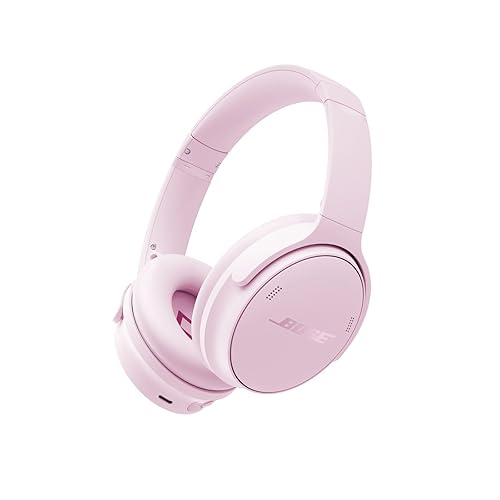
The Bose QC Ultra headphones are a premium noise cancelling pair from Bose’s QuietComfort line, and this guide walks you through what matters before you commit. You will learn how to confirm which version you are looking at, how to judge fit and noise cancelling for your daily routine, and how to set the headphones up so they perform the way Bose intends. By the end, you should know whether the bose qc ultra headphones suit your commute, office or travel habits.
Step 1: Confirm Which Model You Are Looking At
Bose has sold several generations under the QuietComfort Ultra name, and listings do not always make the differences obvious. Before comparing features, check the model number printed inside the left earcup or on the original box. If you are browsing older stock, our overview of Bose QuietComfort Ultra Headphones 1st Gen: 4 Best Options Compared (2026) explains how the first generation differs from later releases. Someone shopping for the newer design should also read Bose QuietComfort Ultra Bluetooth Headphones 2nd Gen Review: Is It Worth It? before deciding.
Shopping for one? See our guide: 7 Best Bose QC SE Headphones of 2026: Buyer's Guide.
Also note whether you are looking at the over-ear or the in-ear variant. Bose uses similar naming across product lines, so a quick check of the form factor prevents an expensive mistake.
Step 2: Check Fit and Comfort
Fit matters more than most spec sheets suggest, because a headphone that clamps too hard will cause fatigue within an hour. Over-ear models should sit around your ears without pressing the cushions flat. Adjust the headband until the earcups rest evenly, then rotate the cups so they cover the full ear.
- Wear the headphones for at least 20 to 30 minutes in a store or during a return window.
- Pay attention to clamping force on the sides of your head, not just the top.
- Check whether your glasses arms create a gap that lets in outside noise.
- Test long-sitting comfort if you wear them for calls or flights.
Owners with larger heads or thicker hair often report that the stock cushions feel warmer over long sessions. Replacement pads can help; the guide to Bose QuietComfort Ultra Headphones Ear Cushion Kit Review (2026) covers how aftermarket options compare.
Step 3: Evaluate Noise Cancelling for Your Environment
Active noise cancelling works best on steady, low-frequency sounds such as airplane engines, HVAC hum and train rumble. It does less against sudden speech or sharp clatter. The Bose QC Ultra headphones use multiple microphones to sample ambient noise and generate an opposing signal, and Bose offers adjustable modes so you can choose how much isolation you want.
Think about where you will use them most. A daily commuter on a bus gets a clear benefit, while someone sitting in a quiet home office may not notice a dramatic change. If you are weighing two Bose lines, Bose QuietComfort Headphones vs Ultra: Which One Fits Your Needs? compares how isolation differs between them.
Step 4: Set Up Controls and Modes
Most owners spend their first session figuring out the touch controls. Bose documentation generally describes tap, swipe and press gestures on the right earcup for volume, playback and voice assistant access. Learn the gestures before you travel, because fumbling in a crowded terminal is frustrating.
- Install the Bose app on your phone and create or sign in to an account.
- Update the firmware when prompted, and keep the headphones charged during the update.
- Open the app and review noise cancelling and transparency mode settings.
- Pair the headphones through Bluetooth and test calls with the microphone.
- Save any custom EQ or preference you want to keep.
If you need to power the headphones down quickly between uses, the process is simple. See How to Turn Off Bose QC Headphones: 4 Quick Methods That Work (2026) for the exact steps.
Step 5: Understand Battery Life and Charging
Bose lists battery life figures for the noise cancelling mode, and those numbers vary with volume, codec and whether you use the immersive audio features. Expect the stated runtime to be a best-case figure under moderate volume. Charging over USB-C is typically quick for a short top-up, which helps on travel days.
| Use case | What to expect |
|---|---|
| Daily commute, moderate volume | Comfortably covers several days of short trips |
| Long flight with ANC on | Plan to charge before departure; carry the cable |
| Heavy use with high volume | Runtime drops faster than the spec sheet suggests |
Step 6: Compare Against Alternatives
No headphone wins every category. Shoppers often cross-check the Bose line against other premium noise cancelling brands. Sony Versus Bose Noise Cancelling Headphones: Which Fits You Best (2026) is useful if you are weighing sound signature and isolation trade-offs. Review roundups such as Noise Cancellation Bose Headphones: 5 Best Picks Compared for 2026 can help you see where these models sit in the wider Bose lineup.
Common Mistakes
- Judging fit from a product photo. Clamp force and cushion depth only show up after you wear them.
- Ignoring firmware updates. Some connection and ANC improvements arrive through the app.
- Expecting full silence. Noise cancelling reduces steady sound; it does not block everything.
- Leaving ANC on by default in every setting. Switching modes can extend battery life and reduce pressure sensation.
- Skipping the return window test. Ask about the return policy before you buy, and test during that period.
Tips for Getting the Most Out of Them
- Store the headphones in a case to protect the hinges and cushions.
- Clean the earcups with a dry cloth; avoid soaking the cushions.
- Keep a short USB-C cable in your bag for emergencies.
- Re-check fit after the first week, since cushions can settle slightly.
Recommended Gear
Two accessories are worth considering for most owners. A hard carrying case protects the folding frame during travel, and a USB-C cable kept in your bag prevents a dead pair on a long day.
- Bose QuietComfort Ultra Headphones Carrying Case – Protects the earcups and headband from crushing in a bag. View on Amazon
- Bose QuietComfort Ultra Headphones Replacement Ear Cushions – Useful if the stock pads feel warm or wear out over time. View on Amazon
- USB-C charging cable – A short, braided cable is easy to pack and handy for quick top-ups. View on Amazon
FAQ
Are the Bose QC Ultra headphones good for flights?
Many travelers use them for flights because active noise cancelling reduces steady engine noise. Charge them before departure and carry a cable in case the battery runs low.
How do I know which generation I have?
Check the model number on the box or inside an earcup, then compare it against Bose’s official product documentation. Generation details are covered in the related guides linked above.
Can I use them with a wired connection?
Confirm this against the specific model’s manual, since wired support varies by version. Bluetooth is the primary connection for these headphones.
Do the ear cushions wear out?
Yes, memory foam and synthetic leather pads gradually compress and wear over time. Replacement cushions are an option if comfort drops.
Is the noise cancelling good enough for an open office?
It reduces steady background sound such as HVAC noise, but it does not block conversations well. Many people pair the headphones with a focus playlist or quiet mode.
How do I update the firmware?
Open the Bose app with the headphones connected and follow the on-screen prompt. Keep the headphones charged during the update.
Should I buy during a sale?
Sales can make sense, but compare the model number and return policy carefully before ordering. Check the warranty terms as well; see Warranty for Bose Headphones: How to Check, Claim and Protect Yours for guidance.
Conclusion
The bose qc ultra headphones reward careful checking. Confirm the exact model, test fit for at least half an hour, and match the noise cancelling to where you actually use them. Set up the app, update the firmware and learn the controls before your first trip, and you will get the most from the pair.
Ready to choose one?
About Owen Palmer
Owen Palmer is part of our editorial team and reviews and edits our brand headphones & noise cancelling guides, checking product details against manufacturer specifications and owner feedback.