
 By Owen Palmer
Updated November 2026
Bose QuietComfort headphones buttons tend to wear out before the rest of the headset does. The power slider, the left-ear noise cancelling button and the action button take the most daily pressing, and once one of them sticks or goes dead, the headphones become frustrating to use even when the battery and drivers are fine. This guide compares three replacement parts sold on Amazon for Bose QuietComfort 35 and QuietComfort 45 models. The selection criteria were compatibility with the named models, the type of control each part replaces, and the patterns owners commonly describe after installing them.
Our top picks at a glance
- 1
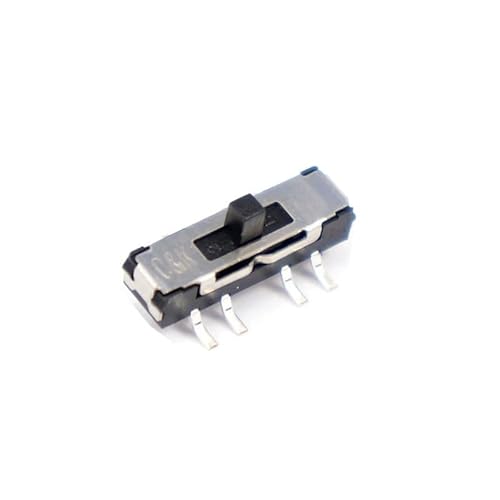 TOP CHOICEBest overallBose Power Button, Slide Switch Replacement for QC35 and QC45View on Amazon
- 2
 Best for a full power slider rebuildPower Button, Sliding Spring Switch Replacement for Bose QC35 QC45View on Amazon
- 3
 Best for the noise cancelling controlHeadphone Replacement Button for Bose QC35 QC45 Left EarView on Amazon
Our Top Picks
Quick Comparison
| Product | Best for | Key feature |
|---|---|---|
| Bose Power Button, Slide Switch Replacement | Owners with a stiff or non-responsive power slider | Slide actuator for manual power operation |
| Power Button, Sliding Spring Switch Replacement | Owners who want the spring and slider replaced together | Sliding spring switch design |
| Headphone Replacement Button, Left Ear | Owners whose noise cancelling or action button stopped responding | Left-ear noise cancelling and action button |
Bose Power Button, Slide Switch Replacement for QC35 and QC45
Bose Power Button, Slide Switch Replacement for QC35, QC45 Headphones, Black, Slide Actuator, Manual Operation
Best for: Owners with a stiff or non-responsive power slider who want a direct swap.
This part is aimed at people whose power slider no longer clicks cleanly into place or no longer registers a press. It is designed for the QuietComfort 35 and QuietComfort 45 family, so it suits anyone comfortable opening a headband housing with a small screwdriver and removing a few clips.
Key specs:
- Compatible with Bose QuietComfort 35 and QuietComfort 45 headphones
- Slide switch replacement with a manual slide actuator
- Black finish
Pros:
- Targets the most common failure point on the power slider
- Straightforward swap with no soldering required for most owners
- Restores tactile feedback when the original slider has worn flat
Cons:
- Installation requires patience with small plastic clips
- Does not address problems in the internal battery or board
Bottom line: A good first choice for owners whose only complaint is the power slider feel or response.
Power Button, Sliding Spring Switch Replacement for Bose QC35 QC45
Power Button, Sliding Spring Switch Replacement for Bose QC35 QC45 Headphone Repair Parts for QuietComfort 45 35 Power Slider Switch
Best for: Owners who want the spring mechanism and slider replaced together.
This option is positioned for owners who suspect the internal spring has lost tension, which often shows up as a slider that feels loose or returns slowly. It is listed for the QuietComfort 35 and QuietComfort 45, and it fits people who want a more complete power-switch rebuild.
Key specs:
- Compatible with Bose QuietComfort 35 and QuietComfort 45
- Sliding spring switch design
- Replacement power slider for the headband control
Pros:
- Addresses spring tension as well as the slider surface
- Useful when the slider feels loose rather than completely dead
- Listed specifically for the QC35 and QC45 family
Cons:
- Disassembly is more involved than a simple button swap
- Owners should confirm the exact model before ordering
Bottom line: Best for owners who have already ruled out a simple surface problem and suspect the spring is the issue.
Headphone Replacement Button for Bose QC35 QC45 Left Ear
Headphone Replacement Button for Bose for QuietComfort 35 45, QC35 II QC45 Left Ear Noise Cancelling Button Action Button, Option Button (Black)
Best for: Owners whose noise cancelling or action button on the left ear stopped responding.
This part targets the left-ear control, which handles noise cancelling and action functions on these models. It suits owners whose noise cancelling toggle has gone unresponsive while the power slider still works normally.
Key specs:
- Compatible with Bose QuietComfort 35, QC35 II and QuietComfort 45
- Left ear noise cancelling and action button
- Black finish
Pros:
- Matches a specific control rather than the whole power assembly
- Useful when only the left-ear button has failed
- Covers the QC35 II as well as the original QC35
Cons:
- Only relevant if the left-ear control is the actual problem
- Replacing it still requires careful disassembly of the ear cup
Bottom line: Pick this one if the left-ear noise cancelling button is the only control that has stopped working.
Buying Guide
Identify Which Button Has Failed
Before ordering any part, test each control separately. A sluggish power slider, a dead noise cancelling toggle and a non-responsive action button have different causes. Owners commonly report that a slider which clicks but does not power the headphones points to the internal switch, while a left-ear button that does nothing across all modes points to the button itself.
Good picks for this: Bose Power Button, Slide Switch Replacement; Headphone Replacement Button, Left Ear
Check Model Compatibility
These parts are listed for the QuietComfort 35, QuietComfort 35 II and QuietComfort 45. The QuietComfort Ultra and the newer QuietComfort models use different control layouts, so a part for the older family will not match. Confirm the model name printed inside the headband before ordering.
Good picks for this: Power Button, Sliding Spring Switch Replacement; Bose Power Button, Slide Switch Replacement
Slider Versus Spring Failure
A power slider that feels loose or returns slowly often suggests spring fatigue, while one that feels gritty may simply be dirty. Cleaning the slot with compressed air and a small amount of isopropyl alcohol can solve some cases before any replacement is needed. If the slider still feels wrong afterward, a full switch replacement is more likely to help.
Good picks for this: Power Button, Sliding Spring Switch Replacement
Installation Tools and Skill Level
Most of these repairs need a small Phillips screwdriver, a plastic pry tool and steady hands. Owners who have never opened a headset should work slowly and photograph each step. Forcing the clips is the most common cause of cracked housings, so patience matters more than tools.
Good picks for this: Bose Power Button, Slide Switch Replacement; Headphone Replacement Button, Left Ear
Button Material and Finish
Replacement controls are usually plastic, and the finish should match the original black tone of the headband or ear cup. A mismatched color is cosmetic, but a loose or rough-edged part can rub against the housing and wear it faster. Check that the part sits flush before closing the housing.
Good picks for this: Headphone Replacement Button, Left Ear; Bose Power Button, Slide Switch Replacement
Warranty and Battery Considerations
If the headphones are still under warranty, a control failure may be covered, and opening the housing could void that coverage. Owners with a weak battery should note that a new power slider will not fix charging or battery-life problems. Consult Bose support or a qualified repair technician before opening a unit that is still covered.
Good picks for this: Power Button, Sliding Spring Switch Replacement
Long-Term Durability
Owners who press the power slider many times a day often find the same part wears again within a few years. Lubricating the slider track lightly and avoiding forceful slides can extend the life of any replacement. Keeping the headphones in a case also reduces grit entering the slot.
Good picks for this: Bose Power Button, Slide Switch Replacement; Power Button, Sliding Spring Switch Replacement
FAQ
Will a replacement button fix a headset that will not turn on?
Not always. If the power slider is the cause, a replacement can help. If the battery is depleted or the internal board has failed, a new button will not restore power. Charge the headphones for at least 15 minutes and test again before opening them.
Do these parts fit the QuietComfort 45 as well as the QC35?
The listings name both the QuietComfort 35 and QuietComfort 45. Still, confirm the model printed inside the headband before ordering, since small layout differences between versions can matter.
Do I need to solder anything?
Most owners can complete a button or slider swap without soldering, since the parts are designed to seat into the existing housing. If the internal connection appears damaged, a qualified technician should inspect it.
Which button should I replace first?
Test each control on its own. If only the left-ear noise cancelling button fails, replace that part alone. If the power slider feels loose or unresponsive, start with the power switch options.
Can cleaning the slider fix it without a replacement?
Sometimes. Dust and grit can make a slider feel stiff, and compressed air plus a small amount of isopropyl alcohol can clear debris. If the slider remains loose or fails to register, a replacement is more likely to be needed.
Is opening the headphones safe?
Opening any electronic device carries some risk, including damage to clips or internal connections. Owners who are unsure should consult a qualified repair technician rather than forcing the housing.
Conclusion
For a stiff or unresponsive power slider, the Bose Power Button, Slide Switch Replacement is the most direct option. Owners who suspect the spring has lost tension should consider the Power Button, Sliding Spring Switch Replacement. If only the left-ear noise cancelling button has failed, the Headphone Replacement Button for the left ear fits that specific need. Test each control before buying, and confirm model compatibility.
Sources
- Consumer product safety guidance on handling damaged electronic devices and battery hazards (cpsc.gov)
- Background on lithium-ion battery care and safe handling for portable electronics (energy.gov)
Related reading
- Bose Quietcomfort Headphones vs Sony Wh-1000xm5 (2026): Which Should You Choose?
- Bose Quietcomfort Headphones vs Beats Studio Pro (2026): Which Should You Choose?
- Bose QuietComfort Ultra Headphones Ear Cushion Kit Review (2026)
- Bose QuietComfort Headphones vs Ultra: Which One Fits Your Needs?
- Bose QuietComfort Headphones Refurbished: What to Check Before You Buy
- 5 Best Bose QuietComfort Headphones Case Options for Travel (2026)
About Owen Palmer
Owen Palmer is part of our editorial team and reviews and edits our brand headphones & noise cancelling guides, checking product details against manufacturer specifications and owner feedback.




